Overview
Turning off contest mode on a keyword that already has entries doesn’t remove those entries. People who have already entered won’t receive the contest auto-reply again, and this change can’t be undone. If you need to change contest settings during a promotion, we recommend duplicating the keyword instead. This keeps your existing entries and reporting intact.
How to change contest settings while a keyword is live
- Within Keywords, find the keyword you want to change.
- Click the copy icon in the Actions column. This creates a duplicate with the same settings.
- On the duplicate, make your changes. Set the Start Time to the moment you want the new settings to take effect.
- Enter the same Group Identifier on both the original keyword and the duplicate. This lets you view their stats and entries together.
- Edit the original keyword and set its End Time to the same moment the duplicate starts. This stops both keywords from sending auto-replies at the same time.
Example
A contest starts at 12:10 PM with contest mode on. At 1:00 PM, the team decides to turn contest mode off. They copy the keyword, set the duplicate to start at 1:00 PM with contest mode off and the same Group Identifier, and set the original to end at 1:00 PM. The duplicate runs until 2:10 PM. Both keywords appear together under one Group Identifier in reporting.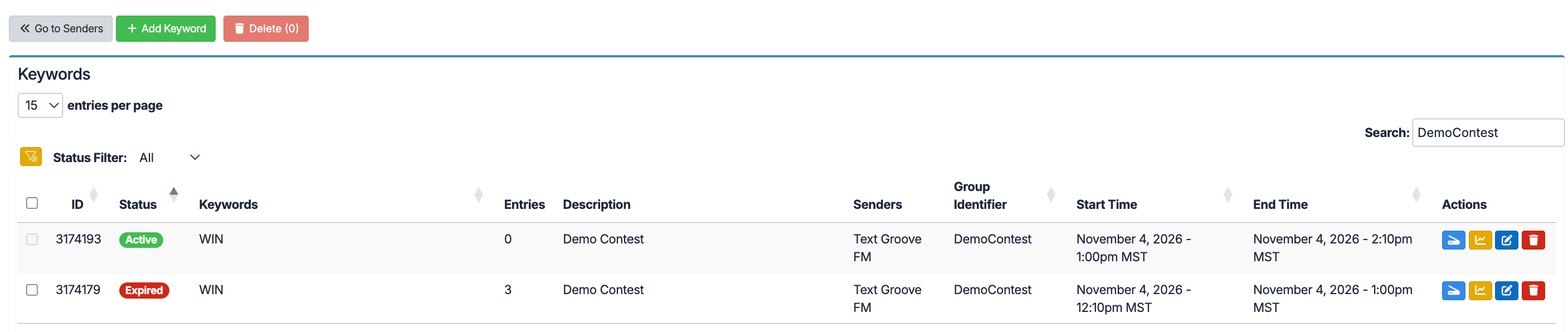
Keep your contest compliant and delivered
Contests on Text Groove have to follow two sets of rules: Text Groove’s Acceptable Use Policy (AUP) and the wireless carriers’ rules.
Under the AUP, every contest must use Contest Mode. Contest auto-replies must fit in one message segment, which is 160 characters or less, or 70 characters or less if the message contains emojis or other special characters.
Carriers put contests and sweepstakes in a category with extra requirements. They can audit programs and suspend numbers that don’t comply.
These settings also help your messages reach your listeners. Carriers use automated filters to catch spam, and two of the patterns those filters look for are long, multi-segment messages and the same message sent over and over.
Without Contest Mode, a keyword sends the full auto-reply every time someone texts in. A listener who texts ten times gets ten identical replies, and across your whole audience that can look like spam to a carrier filter.
Keeping auto-replies to one segment and using Contest Mode lowers the chance that your messages get filtered by mistake.
If you want people to enter more than once, set Contest Mode to a rolling window, such as 24 hours, so each person can enter once per window.
For the full rules, see our Acceptable Use Policy.
Was this article helpful?
That’s Great!
Thank you for your feedback
Sorry! We couldn't be helpful
Thank you for your feedback
Feedback sent
We appreciate your effort and will try to fix the article